
Worldwide Express Delivery | Serving US, UK, Europe, Australia & Global Studios
24/7 Live Editing Support & Fast Turnaround
Precision Clipping Path & Image Masking Services
Boost your e-commerce conversion rates with 100% handmade, pixel-perfect Photoshop clipping paths. Trusted by photographers, agency studios, and Amazon sellers across the US, UK, Europe, and Asia.
Get Free Sample Edit
Send 2 images for free trial — experience our high precision before placing an order.
Years Industry Experience
Images Processed Daily
Precision Accuracy
Express Turnaround
ISO 9001 Certified
Strict quality control standards
ISO 27001 & NDA
Complete data & photo confidentiality
Dedicated Manager
Single point of contact for bulk clients
Unlimited Revisions
100% satisfaction guarantee
Manual Pen Tool vs. Automated AI Background Removal
Why leading e-commerce brands and commercial studios rely on human DTP specialists over AI tool outputs.
Feature
100% Manual Clipping Path
Automated AI Removal
Edge Precision
Crisp, razor-sharp vector paths with pixel perfection
Fuzzy, pixelated, or jagged edges around complex shapes
Transparent & Mesh Handling
Accurate isolation via advanced image masking
Erases fine details, hole cutouts, and translucent glass
File Customization
Delivered as layered PSDs with reusable vector paths
Flat output with permanent pixels removed
E-Commerce Compliance
Guaranteed strict alignment with Amazon & eBay rules
High risk of catalog rejection due to rough boundaries
Zoom Integrity
Flawless zoom rendering up to 300%+ magnification
Artifacts and color bleeding visible under close magnification
Precise Clipping Path Service We Offered
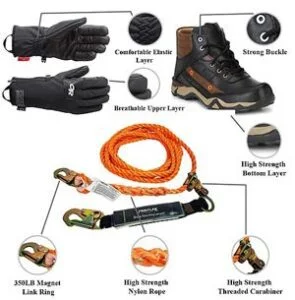
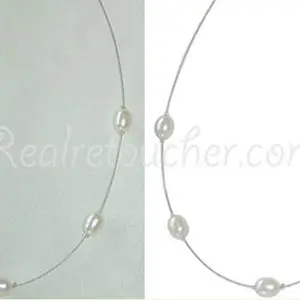
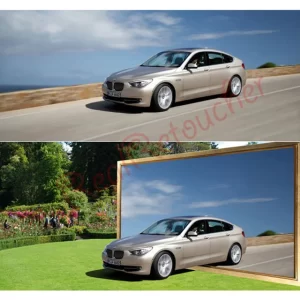
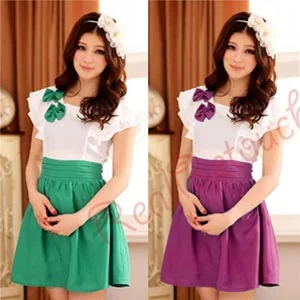
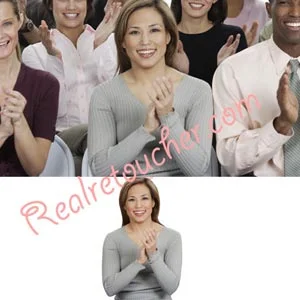
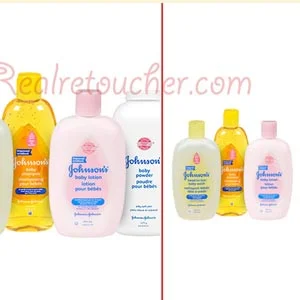
Clipping Path vs. Image Masking
Criteria
Clipping Path
Image Masking
Best Used For
Solid objects with defined, sharp edges (shoes, books, electronics)
Fine detail, soft boundaries, fur, hair, glass, and mesh
Primary Photoshop Tool
Vector Pen Tool
Background Eraser, Color Range, & Alpha Channels
Output Type
Vector paths within the PSD layer file
Raster layer masks preserving translucency & opacity
Specialized Image Editing Categories
We organize our professional clipping path services into six distinct categories to meet exact ecommerce and studio workflow standards.
Basic Clipping Path
Ideal for simple items with straight curves and clean edges. We manually create vector outlines using Photoshop Pen Tool for smooth backgrounds.
- Best for shoes, books, bottles, balls
- Pure white background (Amazon/eBay ready)
- Sharp vector path output
Multi Clipping Path
Designed for complex products requiring color separation, pattern changes, or component isolation for specialized editing.
- Apparel, multi-component machinery, fashion
- Selective color correction & grouping
- Multiple active paths in single PSD file
Image Masking
Advanced isolation technique for transparent, translucent, or porous objects where standard vector paths fall short.
- Glassware, transparent bottles, smoke, mesh
- Preserves fine detail and opacity
- Alpha channel & background removal
Hair Masking
High-end retouching for model portraits, animal fur, and delicate fabrics with complex hair boundaries and flyaways.
- Model photoshoots & fashion lookbooks
- Fine hair strand preservation
- Seamless background blending
Shadow Creation
Add realistic depth to isolated images with custom Drop Shadows, Natural Shadows, or Existing Shadow retention.
- Product footwear, furniture, cosmetics
- Prevents flat, floating product looks
- Fully customizable opacity & blur
Reflection Shadow
Create elegant mirror reflections beneath luxury products, giving an expensive glass-table surface aesthetic.
- Fine jewelry, watches, luxury gadgets
- Enhances product appeal for e-store sales
- Soft gradient reflection falloff
Comprehensive Editing Ecosystem
High-volume processing capacity tailored to modern commercial photography requirements.
Industries We Serve
- eCommerce Stores
- Amazon Sellers
- Shopify Stores
- Product Manufacturers
- Fashion Brands
- Jewelry Companies
- Furniture Retailers
- Automotive Suppliers
- Industrial Equipment
- Advertising Agencies
- Photography Studios
- Printing Companies
Supported Image Types
- Product Images
- Lifestyle Images
- White Background Photos
- Studio Photography
- Catalog Images
- Apparel Photography
- Machinery Images
- Jewelry Photography
- Furniture Photography
- Cosmetic Product Images
- Electronics
- Packaging Photography
Deliverables
- Transparent Background PNG
- Layered PSD
- Clipping Path Included
- High Resolution JPEG
- TIFF
- CMYK Files
- RGB Files
- Print-Ready Images
- Web-Optimized Images
Service Features
- 100% Handmade Photoshop
- Pixel-Perfect Paths
- Manual Quality Inspection
- Bulk Order Processing
- Fast Turnaround
- Global Service
- Free Trial
- Dedicated Project Manager
- Secure File Handling
- 24/7 Customer Support
Service Specifications
Clear reference guidelines for our production standards and delivery formats.
Editing Method
100% Hand-Drawn Photoshop Pen Tool Paths
Delivery Formats
PSD (Layered), PNG (Transparent), TIFF, JPEG, WebP
Maximum Resolution
No Resolution Limit (Supports High-Res Medium Format)
Standard Turnaround
6 to 24 Hours (Express 2-Hour Option Available)
Revision Policy
Unlimited Revisions Until Fully Approved
Quality Assurance
Multi-Stage Manual Quality Inspection
How Our Clipping Path Service Works
Upload Images
Send files via Dropbox, Drive, or FTP.
Instructions
Select path type, background, or shadows.
Manual Editing
DTP artists draw exact vector paths.
Quality Check
Senior QA verifies zoom edge quality.
Final Delivery
Download ready-to-use e-commerce images.
People Also Ask / Related Questions
What is a clipping path used for?
How much does clipping path service cost?
Which is better, clipping path or AI background removal?
Can Photoshop remove backgrounds accurately?
How do I prepare product photos for Amazon?
What is the difference between clipping path and masking?
Can you edit thousands of product images?
Which products require image masking?
What file format is best for transparent backgrounds?
How can I outsource clipping path services?
What industries benefit from clipping path services?
How long does professional background removal take?
Everything You Need To Know
Answers to common questions about our manual clipping path, image masking, and e-commerce editing services.
A clipping service is a manual image editing technique where Photoshop’s Pen Tool is used to create precise vector paths around an object. It allows backgrounds to be removed or replaced while preserving sharp product edges. A clipping service is a manual image editing technique where Photoshop’s Pen Tool is used to create precise vector paths around an object. It allows backgrounds to be removed or replaced while preserving sharp product edges.
Handmade clipping paths provide cleaner edges, greater accuracy, and better quality for products with defined shapes. They are ideal for eCommerce marketplaces, catalogs, advertising, and professional photography. Handmade clipping paths provide cleaner edges, greater accuracy, and better quality for products with defined shapes. They are ideal for eCommerce marketplaces, catalogs, advertising, and professional photography.
Clipping paths work well for: Shoes Electronics Furniture Machinery Automotive parts Jewelry Cosmetics Bottles Fashion accessories Household products Clipping paths work well for: Shoes Electronics Furniture Machinery Automotive parts Jewelry Cosmetics Bottles Fashion accessories Household products
Clipping paths are used for objects with smooth, well-defined edges, while image masking is better suited for transparent materials, mesh, smoke, glass, and fine details where vector paths are insufficient. Clipping paths are used for objects with smooth, well-defined edges, while image masking is better suited for transparent materials, mesh, smoke, glass, and fine details where vector paths are insufficient.
Multi clipping paths are recommended when different parts of an image require separate editing, such as changing colors, adjusting brightness, or editing individual components without affecting the rest of the image. Multi clipping paths are recommended when different parts of an image require separate editing, such as changing colors, adjusting brightness, or editing individual components without affecting the rest of the image.
Yes. We manually isolate products from simple or complex backgrounds using clipping paths, image masking, or hair masking, depending on the object. Yes. We manually isolate products from simple or complex backgrounds using clipping paths, image masking, or hair masking, depending on the object.
We commonly deliver: PSD TIFF PNG JPEG Transparent PNG Other formats are available upon request. We commonly deliver: PSD TIFF PNG JPEG Transparent PNG Other formats are available upon request.
Turnaround depends on image complexity and volume. Small projects can often be completed within a few hours, while large batches are scheduled according to agreed delivery timelines. Turnaround depends on image complexity and volume. Small projects can often be completed within a few hours, while large batches are scheduled according to agreed delivery timelines.
Yes. We handle high-volume image editing for eCommerce businesses, photographers, agencies, and retailers with scalable production workflows. Yes. We handle high-volume image editing for eCommerce businesses, photographers, agencies, and retailers with scalable production workflows.
Yes. We create: Natural Shadows Drop Shadows Existing Shadow Retention Reflection Shadows Soft Shadows to maintain realistic product presentation. Yes. We create: Natural Shadows Drop Shadows Existing Shadow Retention Reflection Shadows Soft Shadows to maintain realistic product presentation.
Yes. Our clipping and background removal services are suitable for major eCommerce platforms, including Amazon, Shopify, Etsy, WooCommerce, Magento, and eBay. Yes. Our clipping and background removal services are suitable for major eCommerce platforms, including Amazon, Shopify, Etsy, WooCommerce, Magento, and eBay.
Yes. Client images are handled through secure workflows, and files remain confidential throughout the editing process. Yes. Client images are handled through secure workflows, and files remain confidential throughout the editing process.
Yes. New clients can submit two sample images to evaluate our editing quality before placing a production order. Yes. New clients can submit two sample images to evaluate our editing quality before placing a production order.
Our services support: eCommerce Fashion Jewelry Furniture Industrial Equipment Automotive Consumer Electronics Food Products Cosmetics Commercial Photography Our services support: eCommerce Fashion Jewelry Furniture Industrial Equipment Automotive Consumer Electronics Food Products Cosmetics Commercial Photography
RealRetoucher provides manually created Photoshop clipping paths, fast turnaround, dedicated quality control, global support, and scalable production for businesses that require consistent, professional image editing. RealRetoucher provides manually created Photoshop clipping paths, fast turnaround, dedicated quality control, global support, and scalable production for businesses that require consistent, professional image editing.
Ready to Scale Your E-Commerce Visuals?
Get high-volume pricing discounts and experience pixel-perfect clipping paths today with a zero-cost free trial.
Get In Touch
303, V.O.C First Street,
Thasildhar Nagar, Madurai, Tamilnadu, India
- Email: msrealretouch@gmail.com
- Hours: Mon-Sat 9:00AM - 5:00PM

© 2026 All Rights Reserved.